 INGInious
During this assignment, you will build neural networks with the help of the Keras python library, which is build upon the TensorFlow library. There are 2 ways to use Tensorflow:
- Install it on your machine using
pip. We recommend TensorFlow version2.20.0(which is the version run by Inginious).- Use an interactive environment such as Kaggle Notebook (where TensorFlow is already installed).
If you do not have a local GPU or do not want to install tensorflow locally, we strongly advise you to use Kaggle, where you can access a GPU for 30 hours per week.
If you decide to use Kaggle, you first need to complete all of the following steps to gain access to the GPU:
- Create a Kaggle account and log in.
- Go to your account settings (icon in the upper right corner).
- Add a display name and complete the phone verification process.
You can create a new notebook on Kaggle by cliking on Code (in the left panel), then New Notebook. Once in the notebook, verify that you are using the GPU by clicking on Settings then Accelerator, and making sure that the GPU is selected.
IMPORTANT: Do not forget to stop your session when you are not working on your code, otherwise you will continue to consume your GPU hours (30h/week)!
In the notebook, you can upload files (such as the dataset) by following these steps:
- Select Upload in the right panel.
- Choose a name for the uploaded file, and select Private for the visibility.
- Click on Create at the bottom left.
- The file should now be visible in the Input section. You can copy the path to this file by hovering over it and selecting Copy file path.
You can save any file created by your code (such as the fitted models) by following these steps:
- Go to Save version -> Quick save (in version type).
- In Advanced settings, choose wether to save the output always or for this version.
- Clik on Save.
When you re-open the same notebook, you can add as input the previously saved files:
- On the right panel, select Add Input and select the previously saved notebook.
- The saved files should now be visible in the Input section.
IMPORTANT: the files created on Kaggle are TEMPORARY and will be deleted once you close the notebook! Check this documention for additional information about this, including alternative procedures.
Your task is to tackle an image recognition problem, for which deep learning has proven to be particularly effective.
Your task at hand is to analyze Street View screenshots of house numbers, known as the SVHN dataset, from which we selected a sample of the images for this project.
The goal is to predict which number, between 0 and 9, is contained at the center of each image.
Each image is a \(32 \times 32 \times 3\) RGB image, and the dataset contains 50,000 train images and 10,000 test images.
To make the task more challenging, the goal is to predict the number at the center of the image, but other numbers may be present in the image as well!
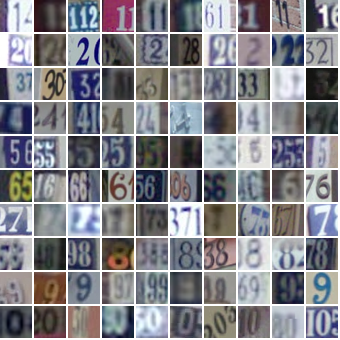
The data can be downloaded from Moodle. Once downloaded in a local directory on your disk (or loaded in Kaggle), you can load the data using the following instructions:
import numpy as np
import tensorflow as tf
from tensorflow import keras

x_train = np.load("p4_2026_svhn_train.npz")["images"].transpose(3, 2, 0, 1)
y_train = np.load("p4_2026_svhn_train.npz")["labels"].squeeze()
x_test = np.load("p4_2026_svhn_test.npz")["images"].transpose(3, 2, 0, 1)
y_test = np.load("p4_2026_svhn_test.npz")["labels"].squeeze()

# Convert string labels as int, followed by one-hot encoding
labels = sorted(list(set(y_train)))
y_train = keras.utils.to_categorical([labels.index(x) for x in y_train])
y_test = keras.utils.to_categorical([labels.index(x) for x in y_test])
After executing the above instructions, x_train and x_test respectively contain the multi-dimensional arrays of the train and test images. The 3 last lines transform the labels (0, 1, ..., 9) contained in y_train and y_test to a binary array using one-hot encoding (i.e. label 0 is represented by the binary vector [1,0,0,0,0,0,0,0,0,0], label 1 by [0,1,0,0,0,0,0,0,0,0], etc.).
It is now time to build your first neural network, using the Sequential class of Keras.