 INGInious
This lab will allow you to:
- Diagnose: use vtysh to inspect BGP neighbor peering status and prefixes advertisement
- Fix: identify and resolve configuration errors
Lab Presentation
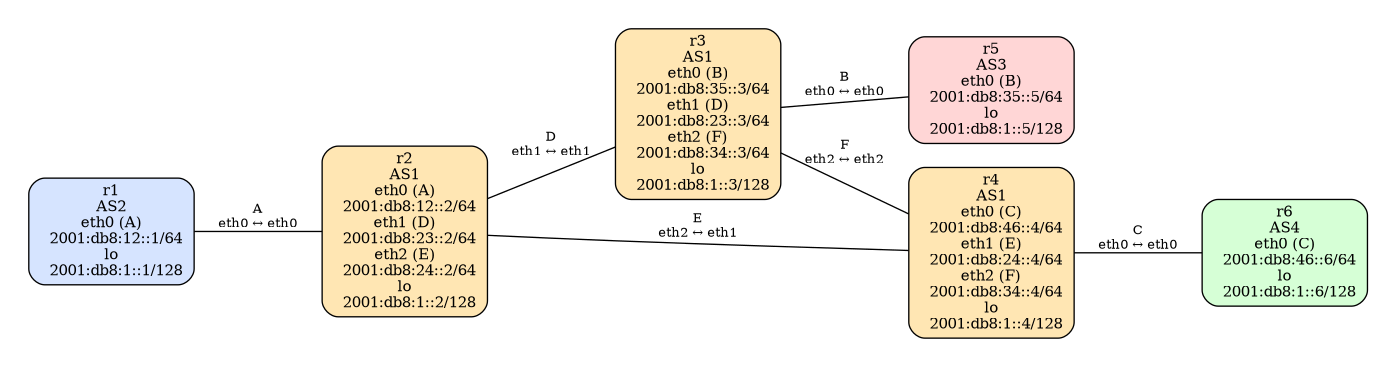
This image represents the correct topology (without errors) that you should obtain after debugging.
Your addressing scheme may be different; the addresses shown in the image are for illustrative purposes only.
This lab contains a preconfigured network infrastructure, but several intentional errors have been introduced. It's up to you to identify and fix them!
📥 Download the Base Lab
To begin the exercise, you need to download the archive. It contains the base configuration with errors to fix.
| [1] | This file gives a score of ~80%, the goal is to reach 100%. |
Diagnostic Tools
vtysh is the unified command-line interface of FRRouting (the routing software used in the containers).
It allows you to configure and inspect all routing protocols (BGP, OSPF, RIP, etc.) from a single interface.
Useful commands for diagnosing BGP:
# Access vtysh on r5
root@r5:/# vtysh
r5#

# Displays the active BGP configuration
show running-config

# All following commands are run inside vtysh
# Display BGP neighbor summary (session status)
show bgp ipv6 summary

# Display the complete BGP routing table (learned routes)
show bgp ipv6 unicast

# Display routes specific to a neighbor
show bgp ipv6 neighbors 2001:db8:12::2 routes
show running-config command allows you to display the active BGP configuration. This is an excellent way to check if your configuration file is properly loaded (without syntax errors).Recommended Approach
Explore the topology
Examine the
lab.conffile to understand which containers are defined and how they are connected. Use the image above to visualize the connections.Connect to containers
Use Kathara to start the lab and connect to each router/container:
cd ./variant

# Start the lab, automatically opens terminals
kathara lstart

# Open a terminal
kathara connect [node_name]

# Remove containers
kathara wipe
Inspect the configuration
Fix the errors
📌 Important Rules:
- ❌ Do not modify the
lab.conffile (it is correct and contains no errors) - ❌ Do not create new files (all corrections are made in existing files)
- ✅ Respect the exact folder structure of the provided archive (relative paths are important)
Modify the files and report these changes to the corresponding files on your host machine (those that will be re-archived).
- ❌ Do not modify the
Validate your fixes locally
cd ./variant
python3 -m kathara_lab_checker --config correction.yaml --no-cache --lab .
# or
kathara_lab_checker --config correction.yaml --no-cache --lab .
Submit your solution
Once all tests pass locally (remember to add more), compress the entire
variantfolder into a .zip file and upload it below.
- Kathara: Documentation | Installation | Commands
- FRRouting Documentation: BGP Commands